Gamepad API
The Gamepad API is how web applications respond to input from gamepads and other game controllers. This API has three interfaces; one that represents the controller connected to the device, one that represents buttons on the connected controller, and finally, one that is for events fired when a gamepad is connected or disconnected.
The Gamepad API is available on modern versions of Chrome, Edge, Firefox, and Safari.
Gamepad Example
1
2
3
4
5
6
7
8
9
10
11
12
13
14
15
16
17
18
19
import { useEffect, useState } from "react";

export default function GamepadDetector() {
  const [gamepadName, setGamepadName] = useState("No gamepad detected!");

  useEffect(() => {
    const handleGamepadconnected = (e: GamepadEvent) => {
      const gp = navigator.getGamepads()[e.gamepad.index] as Gamepad;
      setGamepadName(gp.id);
    };

    window.addEventListener("gamepadconnected", handleGamepadconnected);

    return () =>
      window.removeEventListener("gamepadconnected", handleGamepadconnected);
  });

  return <p>{gamepadName}</p>;
}
Usage
Description of Figure 1
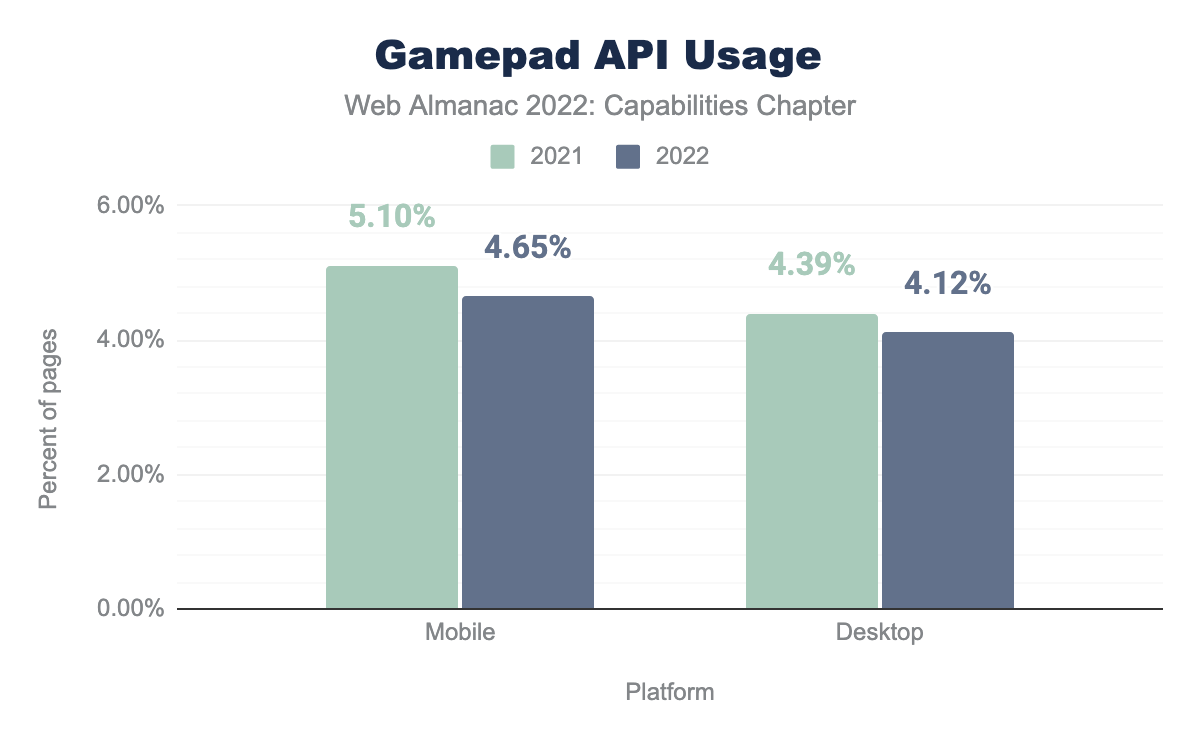
The Gamepad API shrunk in usage from 4.39% in 2021 to 4.12% in 2022 on desktop. On mobile, usage shrunk from 5.10% in 2021 to 4.65% in 2022.
The Gamepad API shrunk in usage from 4.39% in 2021 to 4.12% in 2022 on desktop. On mobile, use shrunk from 5.10% in 2021 to 4.65% in 2022. As a result, this year, the Gamepad API was the seventh most used capability on desktop and the sixth most used mobile.
Web applications such as Google's Stadia (RIP), NVIDIA's GeForce Now, and Microsoft's Xbox Cloud Gaming provide gaming experiences that run on the cloud comparable to the experience of running games on local devices or a gaming console. Thanks to the Gamepad API, these web applications allow users to use traditional console game controllers rather than just a keyboard and mouse.

Description of Figure 2
Connecting an Xbox controller to Google Stadia in the Chrome browser.